


Manage lessons
Activating the Lessons module
Activate the lesson management module in a few clicks
To use the lesson management module, you must first activate it in Plugin.ch's settings. Once activated, you gain access to a complete set of tools for creating and managing your tennis lessons.
Access settings
Go to the menu SETTINGS / MANAGE SETTINGS. This is the area from which you can enable or disable the main features of your Plugin.ch installation.
Access to the settings menu
Locate the lessons setting
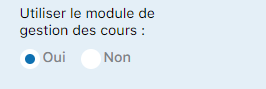
Look for the setting titled "Use of the lesson management module". Once found, you'll see the option to enable it.

The setting to enable in order to use the lessons module
Enable by selecting "YES"
Click the button to select "YES". This action immediately activates the lesson management module in your interface.

Select "YES" to activate the module
Enjoy the new module
Once activation is confirmed, the LESSONS module appears in Plugin.ch's main toolbar. You can now access all lesson management tools from this new section.
Plugin.ch tutorial — Manage lessons